Ollama Buddy - Local LLM Integration for Emacs
I have been playing around with local LLMs recently through ollama and decided to create the basis for an Emacs package to focus on interfacing to ollama specifically. My idea here is to implement something very minimal and as light-weight as possible and that could be run out-of-the-ollamabox with no configuration (obviously the ollama server just needs to be running). I have a deeper dive into my overall design thoughts and decisions in the github README and there are some simple demos:“hello”
https://github.com/captainflasmr/ollama-buddy
Overview
A friendly Emacs interface for interacting with Ollama models. This package provides a convenient way to integrate Ollama’s local LLM capabilities directly into your Emacs workflow with little or no configuration required.
The name is just something a little bit fun and it seems to always remind me of the “bathroom buddy” from the film Gremlins (although hopefully this will work better than that seemed to!)
Screenshots / Demos
Note that all the demos are in real time.
Switching to a better model
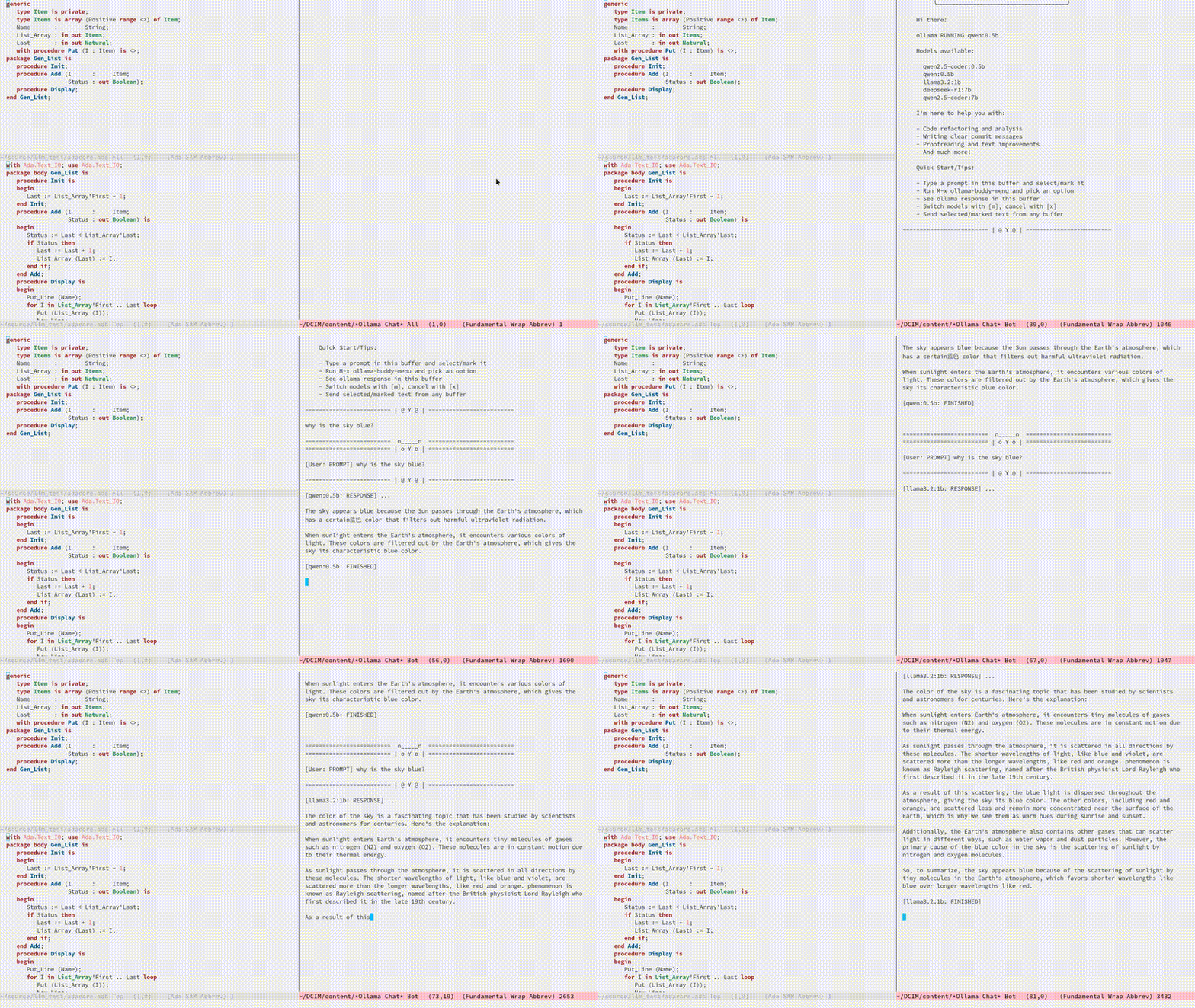
More conversational
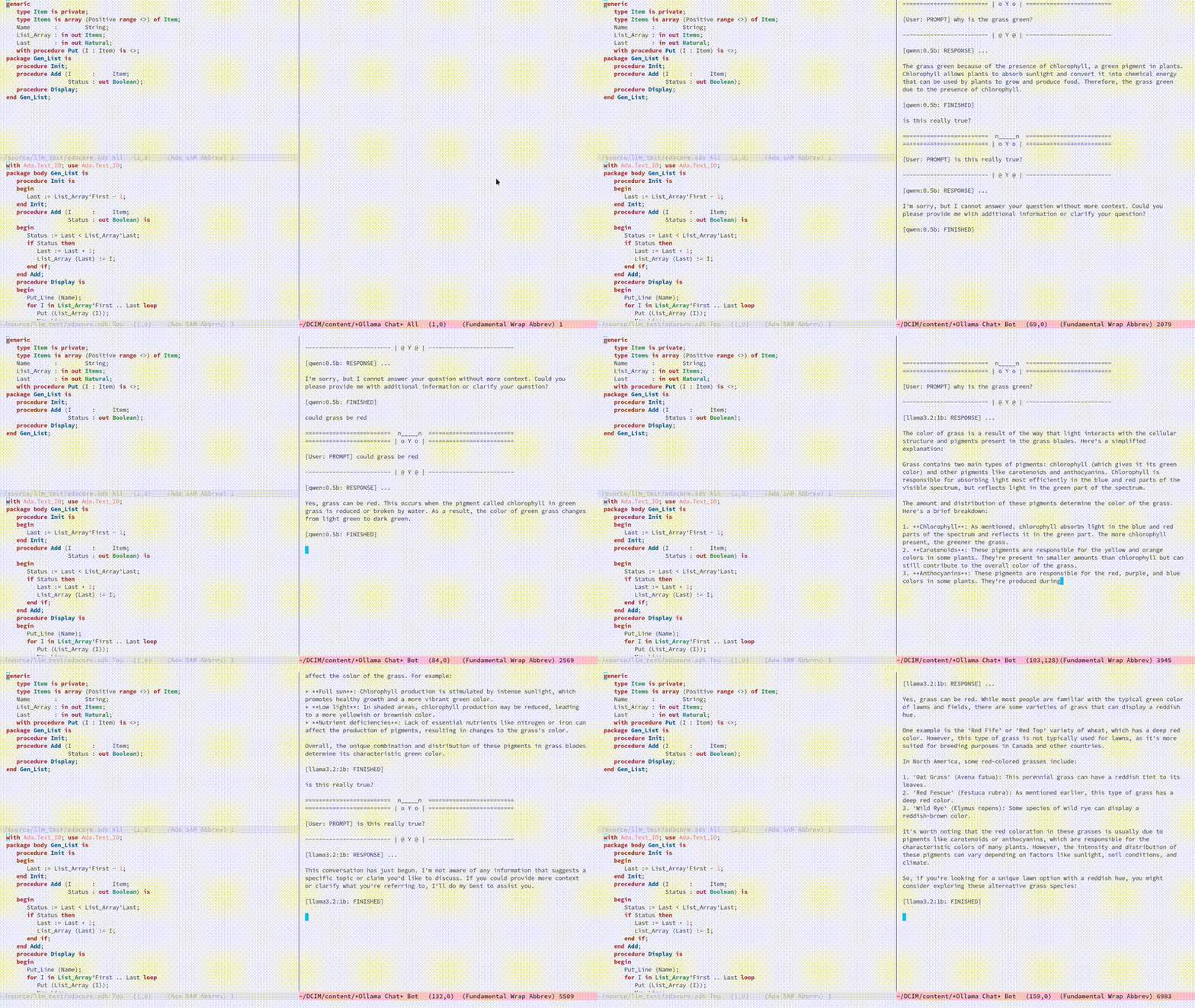
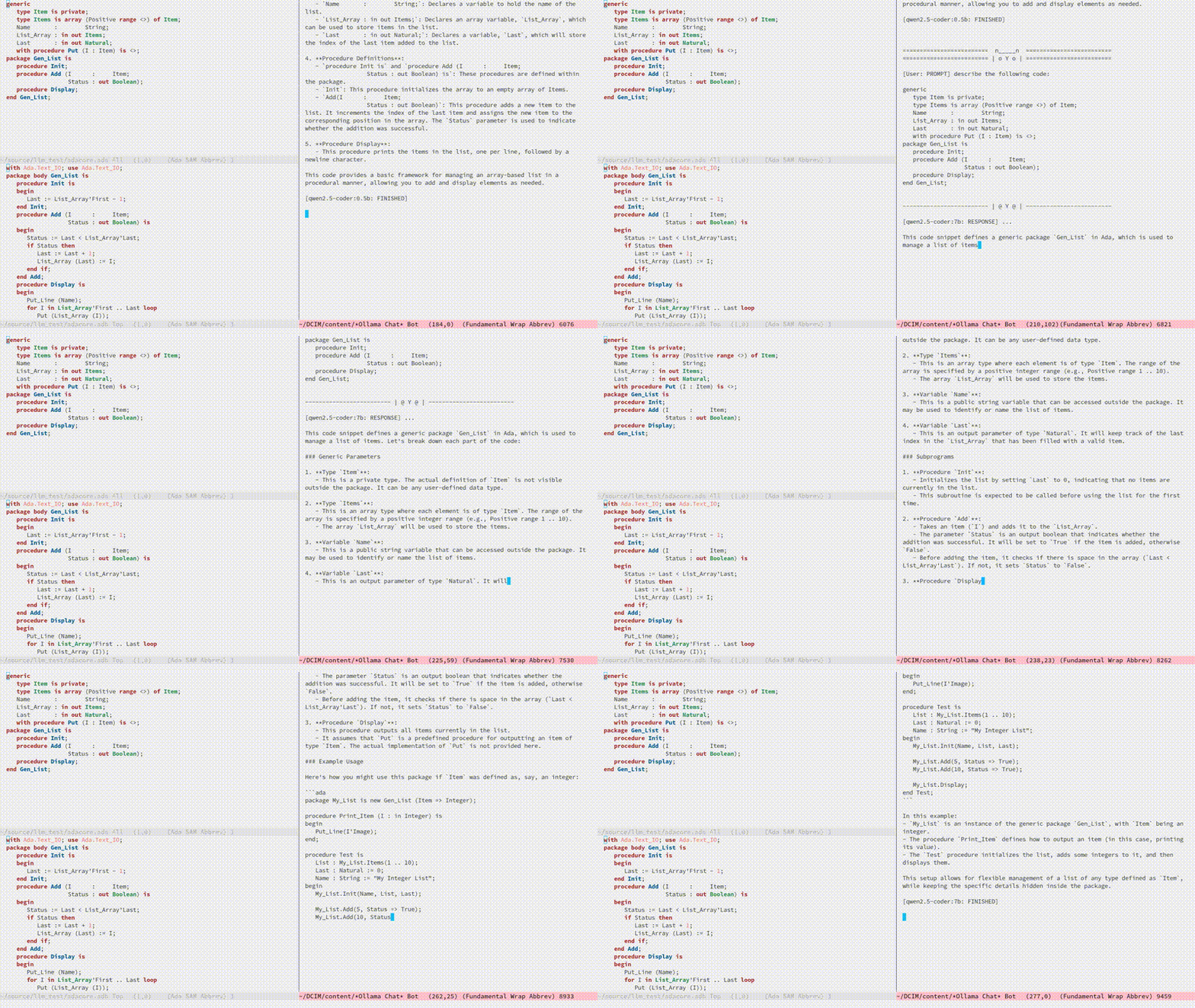
Describing code with different models
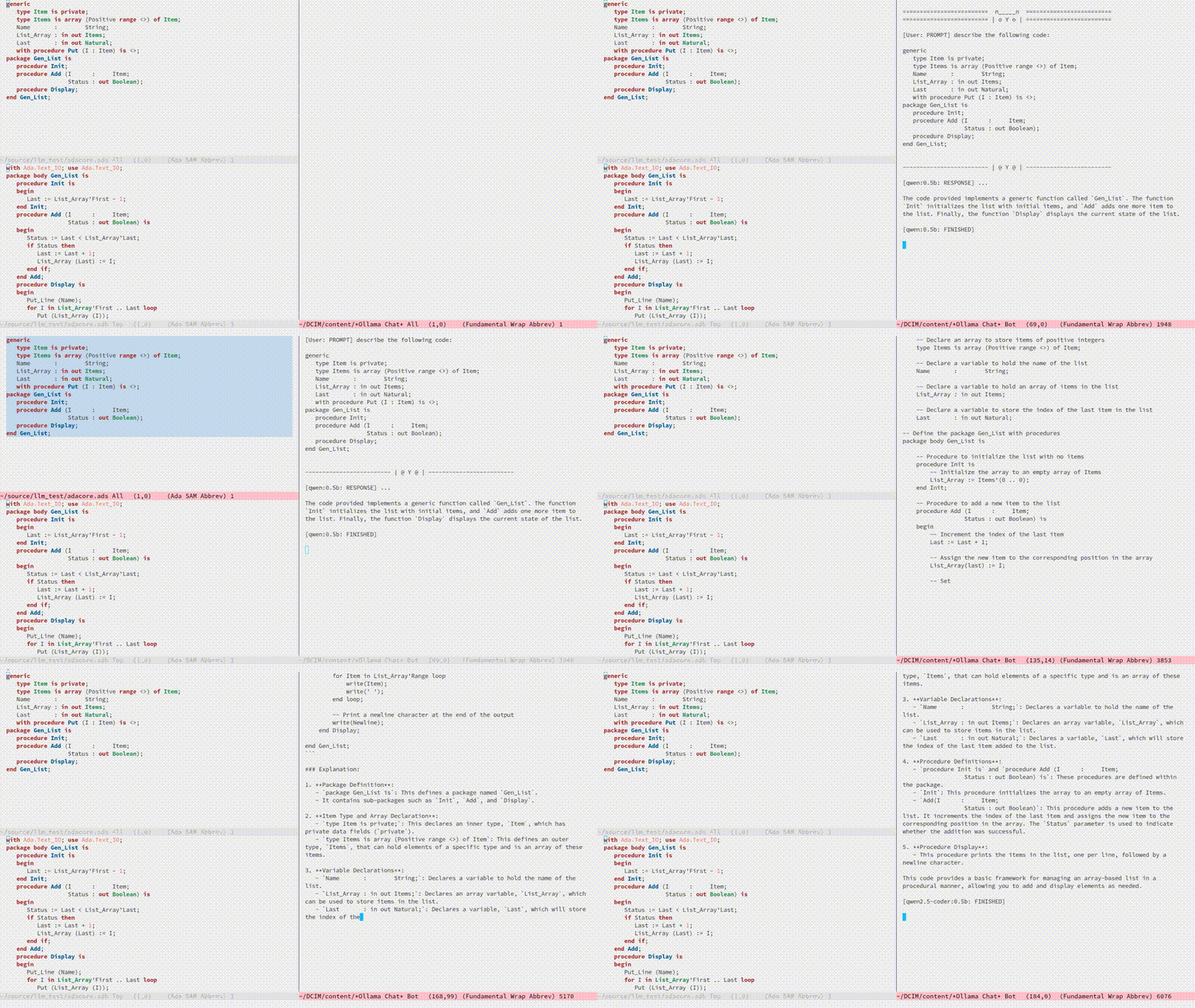
Describing code with a more advanced model
The Menu

Summary of my design ethos
Focused Design Philosophy
- Dedicated solely to Ollama integration (unlike general-purpose LLM packages)
- Intentionally lightweight and minimal setup
- Particularly suitable for air-gapped systems
- Avoids complex backends and payload configurations
Interface Design Choices
- Flexible, customizable menu through defcustom
- Easy-to-extend command system via simple alist modifications
- Region-based interaction model across all buffers
Buffer Implementation
- Simple, editable chat buffer approach
- Avoids complex modes or bespoke functionality
- Trying to leverage standard Emacs text editing capabilities
User Experience
- “AI assistant” style welcome interface
- Zero-config startup possible
- Built-in status monitoring and model listing
- Simple tutorial-style introduction
Technical Simplicity
- REST-based Ollama
- Quickly switch between small local LLMs
- Backwards compatibility with older Emacs versions
- Minimal dependencies
- Straightforward configuration options
Design ethos expanded / why create this package?
The Ollama Emacs package ecosystem is still emerging. Although there are some great implementations available, they tend to be LLM jack-of-all-trades, catering to various types of LLM integrations, including, of course, the major online offerings.
Recently, I have been experimenting with a local solution using ollama. While using ollama through the terminal interface with readline naturally leans toward Emacs keybindings, there are a few limitations:
- Copy and paste do not use Emacs keybindings like readline navigation. This is due to the way key codes work in terminals, meaning that copying and pasting into Emacs would require using the mouse!
- Searching through a terminal with something like Emacs
isearchcan vary depending on the terminal. - Workflow disruption occur when copying and pasting between Emacs and
ollama. - There is no easy way to save a session.
- It is not using Emacs!
I guess you can see where this is going. The question is: how do I integrate a basic query-response mechanism to ollama into Emacs? This is where existing LLM Emacs packages come in, however, I have always found them to be more geared towards online models with some packages offering experimental implementations of ollama integration. In my case, I often work on an air-gapped system where downloading or transferring packages is not straightforward. In such an environment, my only option for LLM interaction is ollama anyway. Given the limitations mentioned earlier of interacting with ollama through a terminal, why not create a dedicated ollama Emacs package that is very simple to set up, very lightweight and leverages Emacs’s editing capabilities to provide a basic query response interface to ollama?
I have found that setting up ollama within the current crop of LLM Emacs packages can be quite involved. I often struggle with the setup, I get there in the end, but it feels like there’s always a long list of payloads, backends, etc., to configure. But what if I just want to integrate Emacs with ollama? It has a RESTful interface, so could I create a package with minimal setup, allowing users to define a default model in their init file (or select one each time if they prefer)? It could also query the current set of loaded models through the ollama interface and provide a completing-read type of model selection, with potentially no model configuration needed!
Beyond just being lightweight and easy to configure, I also have another idea: a flexible menu system. For a while, I have been using a simple menu-based interface inspired by transient menus. However, I have chosen not to use transient because I want this package to be compatible with older Emacs versions. Additionally, I haven’t found a compelling use case for a complex transient menu and I prefer a simple, opaque top level menu.
To achieve this, I have decided to create a flexible defcustom menu system. Initially, it will be configured for some common actions, but users can easily modify it through the Emacs customization interface by updating a simple alist.
For example, to refactor code through an LLM, a prepended text string of something like “Refactor the following code:” is usually applied. To proofread text, “Proofread the following:” could be prepended to the body of the query. So, why not create a flexible menu where users can easily add their own commands? For instance, if someone wanted a command to uppercase some text (even though Emacs can already do this), they could simply add the following entry to the ollama-buddy-menu-items alist:
(?u . ("Upcase"
       (lambda () (ollama-buddy--send "convert the following to uppercase:"))))
Then the menu would present a menu item “Upcase” with a “u” selection, upcasing the selected region. You could go nuts with this, and in order to double down on the autogeneration of a menu concept, I have provided a defcustom ollama-buddy-menu-columns variable so you can flatten out your auto-generated menu as much as you like!
This is getting rambly, but another key design consideration is how prompts should be handled and in fact how do I go about sending text from within Emacs?. Many implementations rely on a chat buffer as the single focal point, which seems natural to me, so I will follow a similar approach.
I’ve seen different ways of defining a prompt submission mechanism, some using <RET>, others using a dedicated keybinding like C-c <RET>, so, how should I define my prompting mechanism? I have a feeling this could get complicated, so lets use the KISS principle, also, how should text be sent from within Emacs buffers? My solution? simply mark the text and send it, not just from any Emacs buffer, but also within the chat window. It may seem slightly awkward at first (especially in the chat buffer, where you will have to create your prompt and then mark it), but it provides a clear delineation of text and ensures a consistent interface across Emacs. For example, using M-h to mark an element requires minimal effort and greatly simplifies the package implementation. This approach also allows users to use the scratch buffer for sending requests if so desired!
Many current implementations create a chat buffer with modes for local keybindings and other features. I have decided not to do this and instead, I will provide a simple editable buffer (ASCII text only) where all ollama interactions will reside. Users will be able to do anything in that buffer; there will be no bespoke Ollama/LLM functionality involved. It will simply be based on a special buffer and to save a session?, just use save-buffer to write it to a file, Emacs to the rescue again!
Regarding the minimal setup philosophy of this package, I also want to include a fun AI assistant-style experience. Nothing complicated, just a bit of logic to display welcome text, show the current ollama status, and list available models. The idea is that users should be able to jump in immediately. If they know how to install/start ollama, they can install the package without any configuration, run `M-x ollama-buddy-menu`, and open the chat. At that point, the “AI assistant” will display the current ollama status and provide a simple tutorial to help them get started.
The backend?, well I decided simply to use curl to stimulate the ollama RESTful API, so you will need curl to be installed.
I have other thoughts regarding the use of local LLMs versus online AI behemoths. The more I use ollama with Emacs through this package, the more I realize the potential of smaller, local LLMs. This package allows for quick switching between these models while maintaining a decent level of performance on a regular home computer. I could, for instance, load up qwen-coder for code-related queries (I have found the 7B Q4/5 versions to work particularly well) and switch to a more general model for other queries, such as llama or even deepseek-r1.
Phew! That turned into quite a ramble, maybe I should run this text through ollama-buddy for proofreading! :)
AI assistant
A simple text information screen will be presented on the first opening of the chat, or when requested through the menu system:
====================  n_____n  ====================
==================== | o Y o | ====================

    ╭──────────────────────────────────────╮
    │              Welcome to               │
    │             OLLAMA BUDDY              │
    │       Your Friendly AI Assistant      │
    ╰──────────────────────────────────────╯

    Hi there!

    ollama RUNNING

    I'm here to help you with:

    - Code refactoring and analysis
    - Writing clear commit messages
    - Proofreading and text improvements
    - And much more!

    Quick Start/Tips:

    - Try typing a prompt in this buffer
    - Select/mark all prompt text (select region)
    - M-x ollama-buddy-menu
    - Select menu item
    - Now wait for ollama to do its magic!
    - You can switch models anytime with [m]
    - Use [x] to cancel a running request
    - You can send to this chat from any buffer

-------------------- | @ Y @ | --------------------
Features
- Interactive menu-driven interface
- Dedicated chat buffer with streaming responses
- Easy model switching
- Quick actions for common tasks:
- Code refactoring
- Git commit message generation
- Code description
- Text proofreading
- Text summarization
- Cute ASCII art separators for chat messages
- Region-based interaction with any buffer
Whats New
Added query finished message.
- Initial release
- Basic chat functionality
- Menu-driven interface
- Region-based interactions
- Model switching support
Prerequisites
- Ollama installed and running locally
- Emacs 27.1 or later
curlcommand-line tool
Installation
Manual Installation
Clone this repository:
git clone https://github.com/captainflasmr/ollama-buddy.git
Add to your init.el:
(add-to-list 'load-path "path/to/ollama-buddy")
(require 'ollama-buddy)
MELPA (Coming Soon)
(use-package ollama-buddy
  :ensure t
  :bind ("C-c l" . ollama-buddy-menu))
Usage
- Start your Ollama server locally
- Use
M-x ollama-buddy-menuor the default keybindingC-c lto open the menu - Select your preferred model using the [m] option
- Select text in any buffer
- Choose an action from the menu:
| Key | Action | Description |
|---|---|---|
| o | Open chat buffer | Opens the main chat interface |
| m | Swap model | Switch between available Ollama models |
| h | Help assistant | Display help message |
| l | Send region | Send selected text directly to model |
| r | Refactor code | Get code refactoring suggestions |
| g | Git commit message | Generate commit message for changes |
| d | Describe code | Get code explanation |
| p | Proofread text | Check text for improvements |
| z | Make concise | Reduce wordiness while preserving meaning |
| c | Custom Prompt | Enter bespoke prompt through the minibuffer |
| x | Kill request | Cancel current Ollama request |
| q | Quit | Exit the menu |
Key Bindings
| Key | Description |
|---|---|
C-c l | Open ollama-buddy menu |
Customization
| Custom variable | Description |
|---|---|
| ollama-buddy-awesome-categorize-prompts | Whether to categorize prompts based on common keywords. |
| ollama-buddy-awesome-prompts-file | Filename containing the prompts within the repository. |
| ollama-buddy-grok-api-endpoint | Endpoint for Grok chat completions API. |
| ollama-buddy-remote-models | List of available remote models. |
| ollama-buddy-command-definitions | Comprehensive command definitions for Ollama Buddy. |
| ollama-buddy-codestral-default-model | Default Mistral Codestral model to use. |
| ollama-buddy-interface-level | Level of interface complexity to display. |
| ollama-buddy-show-params-in-header | Whether to show modified parameters in the header line. |
| ollama-buddy-user-prompts-default-categories | List of default categories for user system prompts. |
| ollama-buddy-debug-mode | When non-nil, show raw JSON messages in a debug buffer. |
| ollama-buddy-rag-qdrant-url | URL for Qdrant server. |
| ollama-buddy-codestral-api-key | API key for accessing Mistral Codestral services. |
| ollama-buddy-mode | Non-nil if Ollama-Buddy mode is enabled. |
| ollama-buddy-grok-marker-prefix | Prefix used to identify Grok models in the ollama-buddy interface. |
| ollama-buddy-reasoning-markers | List of marker pairs that encapsulate reasoning/thinking sections. |
| ollama-buddy-awesome-update-on-startup | Whether to automatically update prompts when Emacs starts. |
| ollama-buddy-context-bar-width | Width of the context progress bar in characters. |
| ollama-buddy-sessions-directory | Directory containing ollama-buddy session files. |
| ollama-buddy-history-model-view-mode-map | Keymap for model-specific history viewing mode. |
| ollama-buddy-rag-provider-type | Type of vector database provider to use. |
| ollama-buddy-menu-columns | Number of columns to display in the Ollama Buddy menu. |
| ollama-buddy-gemini-api-endpoint | Endpoint format for Google Gemini API. |
| ollama-buddy-fabric-pattern-categories | List of pattern categories to focus on when listing patterns. |
| ollama-buddy-rag-qdrant-api-key | API key for Qdrant server. |
| ollama-buddy-status-update-interval | Interval in seconds to update the status line with background operations. |
| ollama-buddy-fabric-update-on-startup | Whether to automatically update patterns when Emacs starts. |
| ollama-buddy-available-models | List of available models to pull from Ollama Hub. |
| ollama-buddy-grok-max-tokens | Maximum number of tokens to generate in the response. |
| ollama-buddy-highlight-models-enabled | Highlight model names with distinctive colors in Ollama Buddy buffers. |
| ollama-buddy-claude-max-tokens | Maximum number of tokens to generate in the response. |
| ollama-buddy-openai-marker-prefix | Prefix to indicate that a model is from OpenAI rather than Ollama. |
| ollama-buddy-history-enabled | Whether to use conversation history in Ollama requests. |
| ollama-buddy-grok-api-key | API key for accessing Grok services. |
| ollama-buddy-grok-default-model | Default Grok model to use. |
| ollama-buddy-concat-exclude-directories | |
| ollama-buddy-claude-marker-prefix | Prefix used to identify Claude models in the model list. |
| ollama-buddy-roles-directory | Directory containing ollama-buddy role preset files. |
| ollama-buddy-codestral-temperature | Temperature setting for Mistral Codestral requests (0.0-2.0). |
| ollama-buddy-fabric-local-dir | Local directory where Fabric patterns will be stored. |
| ollama-buddy-show-history-indicator | Whether to show the history indicator in the header line. |
| ollama-buddy-context-size-thresholds | Thresholds for context usage warnings. |
| ollama-buddy-rag-chroma-url | URL for Chroma server. |
| ollama-buddy-rag-collection-name | Name of the vecdb collection to use for RAG. |
| ollama-buddy-mode-map | Keymap for ollama-buddy mode. |
| ollama-buddy-marker-prefix | Prefix used to identify Ollama models in the ollama-buddy interface. |
| ollama-buddy-codestral-marker-prefix | Prefix to indicate that a model is from Mistral Codestral rather than Ollama. |
| ollama-buddy-max-file-size | Maximum size for attached files in bytes. |
| ollama-buddy-fabric-patterns-subdir | Subdirectory within the Fabric repo containing the patterns. |
| ollama-buddy-context-display-type | How to display context usage in the status bar. |
| ollama-buddy-autocomplete-model | |
| ollama-buddy-awesome-repo-url | URL of the Awesome ChatGPT Prompts GitHub repository. |
| ollama-buddy-user-prompts-directory | Directory where user system prompts are stored. |
| ollama-buddy-openai-api-endpoint | Endpoint for OpenAI chat completions API. |
| ollama-buddy-vision-models | List of models known to support vision capabilities. |
| ollama-buddy-params-active | Currently active values for Ollama API parameters. |
| ollama-buddy-embedding-model | The default model to use for generating embeddings. |
| ollama-buddy-codestral-api-endpoint | Endpoint for Mistral Codestral API. |
| ollama-buddy-openai-default-model | Default OpenAI model to use. |
| ollama-buddy-claude-default-model | Default Claude model to use. |
| ollama-buddy-params-modified | Set of parameters that have been explicitly modified by the user. |
| ollama-buddy-gemini-temperature | Temperature setting for Gemini requests (0.0-1.0). |
| ollama-buddy-current-session-name | The name of the currently loaded session. |
| ollama-buddy-host | Host where Ollama server is running. |
| ollama-buddy-curl-timeout | Timeout in seconds for curl requests. |
| ollama-buddy-image-formats | List of regular expressions matching supported image file formats. |
| ollama-buddy-streaming-enabled | Whether to use streaming mode for responses. |
| ollama-buddy-max-history-length | Maximum number of message pairs to keep in conversation history. |
| ollama-buddy-gemini-default-model | Default Gemini model to use. |
| ollama-buddy-default-model | Default Ollama model to use. |
| ollama-buddy-claude-temperature | Temperature setting for Claude requests (0.0-1.0). |
| ollama-buddy-vision-enabled | Whether to enable vision support for models that support it. |
| ollama-buddy-display-token-stats | Whether to display token usage statistics in responses. |
| ollama-buddy-show-context-percentage | Whether to show context percentage in the status bar. |
| ollama-buddy-claude-api-endpoint | Endpoint for Anthropic Claude API. |
| ollama-buddy-gemini-api-key | API key for accessing Google Gemini services. |
| ollama-buddy-openai-max-tokens | Maximum number of tokens to generate in the response. |
| ollama-buddy-claude-api-key | API key for accessing Anthropic Claude services. |
| ollama-buddy-params-profiles | Predefined parameter profiles for different usage scenarios. |
| ollama-buddy-awesome-local-dir | Local directory where Awesome ChatGPT Prompts will be stored. |
| ollama-buddy-params-defaults | Default values for Ollama API parameters. |
| ollama-buddy-mode-line-segment | Mode line segment for Ollama Buddy. |
| ollama-buddy-grok-temperature | Temperature setting for Grok requests (0.0-1.0). |
| ollama-buddy-port | Port where Ollama server is running. |
| ollama-buddy-default-register | Default register to store the current response when not in multishot mode. |
| ollama-buddy-fabric-repo-url | URL of the Fabric GitHub repository. |
| ollama-buddy-gemini-max-tokens | Maximum number of tokens to generate in the response. |
| ollama-buddy-modelfile-directory | Directory for storing temporary Modelfiles. |
| ollama-buddy-fallback-context-sizes | Mapping of model names to their default context sizes. |
| ollama-buddy-communication-backend | Communication backend to use for Ollama API requests. |
| ollama-buddy-codestral-max-tokens | Maximum number of tokens to generate in the response. |
| ollama-buddy-curl-executable | Path to the curl executable. |
| ollama-buddy-context-bar-chars | Characters used to draw the context progress bar. |
| ollama-buddy-supported-file-types | List of regex patterns for supported file types. |
| ollama-buddy-openai-temperature | Temperature setting for OpenAI requests (0.0-2.0). |
| ollama-buddy-convert-markdown-to-org | Whether to automatically convert markdown to `org-mode’ format in responses. |
| ollama-buddy-mode-hook | Hook run after entering or leaving `ollama-buddy-mode'. |
| ollama-buddy-gemini-marker-prefix | Prefix used to identify Gemini models in the ollama-buddy interface. |
| ollama-buddy-hide-reasoning | When non-nil, hide reasoning/thinking blocks from the stream output. |
| ollama-buddy-openai-api-key | API key for accessing OpenAI services. |
Customize the package to the default startup using:
(setq ollama-buddy-current-model "qwen-4q:latest")

;; Change number of menu columns
(setq ollama-buddy-menu-columns 4)

;; Customize separators
(setq ollama-buddy-separator-1 "Your custom separator here")
(setq ollama-buddy-separator-2 "Another custom separator")
Available customization options:
Contributing
Contributions are welcome! Please:
- Fork the repository
- Create a feature branch
- Commit your changes
- Open a pull request
License
Acknowledgments
- Ollama for making local LLM inference accessible
- Emacs community for continuous inspiration
Issues
Report issues on the GitHub Issues page
Alternative LLM based packages
To the best of my knowledge, there are currently a few Emacs packages related to Ollama, though the ecosystem is still relatively young:
llm.el (by Jacob Hacker)
- A more general LLM interface package that supports Ollama as one of its backends
- GitHub: https://github.com/ahyatt/llm
- Provides a more abstracted approach to interacting with language models
- Supports multiple backends including Ollama, OpenAI, and others
gptel (by Karthik Chikmagalur)
- While primarily designed for ChatGPT and other online services, it has experimental Ollama support
- GitHub: https://github.com/karthink/gptel
- Offers a more integrated chat buffer experience
- Has some basic Ollama integration, though it’s not the primary focus
chatgpt-shell (by xenodium)
- Primarily designed for ChatGPT, but has some exploration of local model support
- GitHub: https://github.com/xenodium/chatgpt-shell
- Not specifically Ollama-focused, but interesting for comparison
ellama
- TODO
Alternative package comparison
Let’s compare ollama-buddy to the existing solutions:
llm.el
Pros:
- Provides a generic LLM interface
- Supports multiple backends
- More abstracted and potentially more extensible
Cons:
- Less Ollama-specific
- More complex configuration
- Might have overhead from supporting multiple backends
ollama-buddyis more:- Directly focused on Ollama
- Lightweight and Ollama-native
- Provides a more interactive, menu-driven approach
- Simpler to set up for Ollama specifically
gptel
Pros:
- Sophisticated chat buffer interface
- Active development
- Good overall UX
Cons:
- Primarily designed for online services
- Ollama support is experimental
- More complex architecture
ollama-buddydifferentiates by:- Being purpose-built for Ollama
- Offering a more flexible, function-oriented approach
- Providing a quick, lightweight interaction model
- Having a minimal, focused design
chatgpt-shell
Pros:
- Mature shell-based interaction model
- Rich interaction capabilities
Cons:
- Not truly Ollama-native
- Primarily focused on online services
- More complex setup
ollama-buddystands out by:- Being specifically designed for Ollama
- Offering a simpler, more direct interaction model
- Providing a quick menu-based interface
- Having minimal dependencies
ellama
- TODO