New package dired-video-thumbnail added to MELPA!
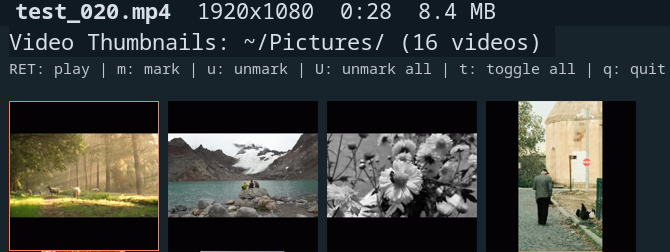
I have created another package!, this time something that I thought was missing from the mighty Emacs and that is the ability to show video thumbnails in a grid and to be able to filter, sort e.t.c. Basically like an enhanced image-dired. I have been increasingly using image-dired for my image editing and management needs and am always adding little improvements, to such an extent I decided to create a video thumb grid package, enjoy!
Introduction
dired-video-thumbnail is an Emacs package that provides image-dired style thumbnail viewing for video files. It extracts thumbnails from videos using ffmpeg and displays them in a grid layout, allowing you to visually browse and manage video collections directly from Emacs.
Features
- Thumbnail grid display - View video thumbnails in a configurable grid layout
- Persistent caching - Thumbnails are cached and only regenerated when the source file changes
- Async generation - Emacs remains responsive while thumbnails are generated in the background
- Dired integration - Marks sync bidirectionally with the associated dired buffer
- Visual mark indication - Marked thumbnails display a coloured border (like
image-dired) - Dynamic header line - Shows filename, dimensions, duration, and file size for the current video
- Click to play - Open videos in your preferred external player
- Cross-platform - Works on Linux, macOS, and Windows
- Resizable thumbnails - Adjust thumbnail size on the fly
- Sorting - Sort videos by name, date, size, or duration
- Filtering - Filter videos by name pattern, duration range, or file size
- Recursive search - Browse videos across subdirectories with optional auto-recursive mode
- Transient menu - Comprehensive command menu accessible via
.orC-c .
Whats New
0.3.0
Added transient menu interface
Introduced a comprehensive transient menu (dired-video-thumbnail-transient) providing quick access to all commands via . or C-c . in the thumbnail buffer. The menu displays current state (sort order, filters, video count, recursive/wrap mode) and organises commands into logical groups: Navigation, Playback, Sorting, Filtering, Marking, Delete, Display, and Other.
0.2.0
Enhanced package with sorting, filtering, and docs
Added sorting and filtering features to dired-video-thumbnail. Introduced customizable options for sorting and filtering criteria, and implement interactive commands for toggling these settings. Included comprehensive documentation in Texinfo format, covering installation, usage, and customization.
Requirements
- Emacs 28.1 or later
- ffmpeg and
ffprobeinstalled and available in your PATH - transient 0.4.0 or later (for the transient menu)
Installation
Manual
Download dired-video-thumbnail.el and place it in your load-path:
(add-to-list 'load-path "/path/to/dired-video-thumbnail/")
(require 'dired-video-thumbnail)
use-package
(use-package dired-video-thumbnail
  :load-path "/path/to/dired-video-thumbnail/"
  :bind (:map dired-mode-map
         ("C-t v" . dired-video-thumbnail)))
straight.el
(straight-use-package
 '(dired-video-thumbnail :type git :host github :repo "captainflasmr/dired-video-thumbnail"))
Usage
Basic Usage
- Open a directory containing video files in dired
- Run
M-x dired-video-thumbnail - A new buffer opens displaying thumbnails for all videos in the directory
- The cursor automatically moves to the first thumbnail
With Marked Files
- In dired, mark specific video files with
m - Run
M-x dired-video-thumbnail - Only thumbnails for the marked videos are displayed
Recursive Mode
To include videos from subdirectories:
- Use
C-u M-x dired-video-thumbnail(with prefix argument) - Or run
M-x dired-video-thumbnail-recursive - Or press
Rin the thumbnail buffer to toggle recursive mode
When dired-video-thumbnail-auto-recursive is enabled (the default), the package automatically searches subdirectories if the current directory contains no video files.
Suggested Keybinding
Add a keybinding in dired for quick access:
(with-eval-after-load 'dired
  (define-key dired-mode-map (kbd "C-t v") #'dired-video-thumbnail))
Transient Menu
Press . or C-c . in the thumbnail buffer to open the transient menu. This provides a comprehensive interface to all commands with a live status display.
State: Sort: name ↑ | Videos: 42 | Recursive: OFF | Wrap: ON

Navigation            Playback       Sorting              Filtering
n Next                RET Play video s Sort menu...       / Filter menu...
p Previous            o Play video   S Interactive sort   \ Interactive filter
C-n Next row                         r Reverse order      c Clear filters
C-p Previous row
d Go to dired

Marking               Delete         Display              Other
m Mark menu...        D Delete       v Display menu...    g Regenerate thumbnail
M Mark all            x Delete marked+ Larger thumbnails  G Regenerate all
U Unmark all                         - Smaller thumbnails C Clear cache
t Toggle all marks                   w Toggle wrap        ? Help
                                     R Toggle recursive   q Quit menu
                                                          Q Quit buffer
The status line at the top shows:
- Current sort criteria and direction (e.g.,
name ↑) - Number of videos displayed (and total if filtered)
- Recursive mode status
- Wrap display mode status
- Active filters (if any)
Submenus
Several keys open submenus with additional options:
s- Sort menu: Sort by name, date, size, or duration; reverse order/- Filter menu: Filter by name regexp, duration range, or size range; clear filtersm- Mark menu: Mark/unmark current, toggle current, mark/unmark/toggle allv- Display menu: Adjust size, toggle wrap/recursive, refresh, regenerate thumbnails
Header Line
As you navigate between thumbnails, the header line dynamically displays information about the current video:
- Mark indicator - A red
*if the video is marked - Filename - The video filename in bold
- Dimensions - Video resolution (e.g.,
1920x1080) - Duration - Video length (e.g.,
5:32or1:23:45) - File size - Size in MB (e.g.,
45.2 MB)
The header also shows current sort settings (e.g., [name ↑]), active filters, and a [recursive] indicator when browsing subdirectories.
Keybindings
In the *Video Thumbnails* buffer:
Transient Menu
| Key | Command | Description |
|---|---|---|
. | dired-video-thumbnail-transient | Open transient menu |
C-c . | dired-video-thumbnail-transient | Open transient menu |
Navigation
| Key | Command | Description |
|---|---|---|
n | dired-video-thumbnail-next | Move to next thumbnail |
p | dired-video-thumbnail-previous | Move to previous thumbnail |
SPC | dired-video-thumbnail-play | Play video at point |
C-f | dired-video-thumbnail-forward | Move to next thumbnail |
C-b | dired-video-thumbnail-backward | Move to previous thumbnail |
<right> | dired-video-thumbnail-forward | Move to next thumbnail |
<left> | dired-video-thumbnail-backward | Move to previous thumbnail |
<up> | dired-video-thumbnail-previous-row | Move up one row |
<down> | dired-video-thumbnail-next-row | Move down one row |
d | dired-video-thumbnail-goto-dired | Switch to associated dired buffer |
q | quit-window | Close the thumbnail buffer |
Q | dired-video-thumbnail-quit-and-kill | Quit and kill the buffer |
Playback
| Key | Command | Description |
|---|---|---|
RET | dired-video-thumbnail-play | Play video at point |
o | dired-video-thumbnail-play | Play video at point |
mouse-1 | dired-video-thumbnail-play | Play video (click) |
On Linux, videos open with xdg-open. On macOS, they open with open. On Windows, they open with the system default player. You can also specify a custom player.
Marking
Marks are synchronised with the associated dired buffer, so marking a video in the thumbnail view also marks it in dired, and vice versa.
| Key | Command | Description |
|---|---|---|
m | dired-video-thumbnail-mark | Mark video and move to next |
u | dired-video-thumbnail-unmark | Unmark video and move to next |
mouse-3 | dired-video-thumbnail-toggle-mark | Toggle mark (right-click) |
M | dired-video-thumbnail-mark-all | Mark all videos |
U | dired-video-thumbnail-unmark-all | Unmark all videos |
t | dired-video-thumbnail-toggle-all-marks | Invert all marks |
Deletion
| Key | Command | Description |
|---|---|---|
D | dired-video-thumbnail-delete | Delete video at point (with confirmation) |
x | dired-video-thumbnail-delete-marked | Delete marked videos (with confirmation) |
Display
| Key | Command | Description |
|---|---|---|
+ | dired-video-thumbnail-increase-size | Increase thumbnail size |
- | dired-video-thumbnail-decrease-size | Decrease thumbnail size |
r | dired-video-thumbnail-refresh | Refresh the display |
w | dired-video-thumbnail-toggle-wrap | Toggle wrap mode (flow vs fixed cols) |
R | dired-video-thumbnail-toggle-recursive | Toggle recursive directory search |
g | dired-video-thumbnail-regenerate | Regenerate thumbnail at point |
G | dired-video-thumbnail-regenerate-all | Regenerate all thumbnails |
Sorting
| Key | Command | Description |
|---|---|---|
S | dired-video-thumbnail-sort | Interactive sort menu |
sn | dired-video-thumbnail-sort-by-name | Sort by filename |
sd | dired-video-thumbnail-sort-by-date | Sort by modification date |
ss | dired-video-thumbnail-sort-by-size | Sort by file size |
sD | dired-video-thumbnail-sort-by-duration | Sort by video duration |
sr | dired-video-thumbnail-sort-reverse | Reverse sort order |
Filtering
| Key | Command | Description |
|---|---|---|
\ | dired-video-thumbnail-filter | Interactive filter menu |
/n | dired-video-thumbnail-filter-by-name | Filter by name regexp |
/d | dired-video-thumbnail-filter-by-duration | Filter by duration range |
/s | dired-video-thumbnail-filter-by-size | Filter by size range |
/c | dired-video-thumbnail-filter-clear | Clear all filters |
// | dired-video-thumbnail-filter-clear | Clear all filters |
Help
| Key | Command | Description |
|---|---|---|
h | dired-video-thumbnail-help | Show help |
? | dired-video-thumbnail-help | Show help |
Customisation
All customisation options are in the dired-video-thumbnail group. Use M-x customize-group RET dired-video-thumbnail RET to browse them interactively.
Thumbnail Cache Location
Thumbnails are stored in ~/.emacs.d/dired-video-thumbnails/ by default:
(setq dired-video-thumbnail-cache-dir "~/path/to/cache/")
Thumbnail Size
Control the generated thumbnail size and display height:
(setq dired-video-thumbnail-size 200)           ;; Generated thumbnail size (pixels)
(setq dired-video-thumbnail-display-height 150) ;; Display height in buffer
Thumbnails are generated as squares to ensure consistent grid alignment regardless of video aspect ratio.
Grid Layout
Set the number of columns in the thumbnail grid:
(setq dired-video-thumbnail-columns 4)
Wrap Display
Control whether thumbnails wrap to fill the window width:
(setq dired-video-thumbnail-wrap-display t)   ;; Wrap to window width (default)
(setq dired-video-thumbnail-wrap-display nil) ;; Use fixed columns
(setq dired-video-thumbnail-spacing 4)        ;; Spacing between thumbnails (pixels)
Thumbnail Timestamp
By default, thumbnails are extracted at 5 seconds into the video. Change this to get a more representative frame:
(setq dired-video-thumbnail-timestamp "00:00:10")  ;; 10 seconds in
(setq dired-video-thumbnail-timestamp "00:01:00")  ;; 1 minute in
(setq dired-video-thumbnail-timestamp nil)         ;; Let ffmpeg choose
Video Player
Set your preferred video player:
(setq dired-video-thumbnail-video-player "mpv")
(setq dired-video-thumbnail-video-player "vlc")
(setq dired-video-thumbnail-video-player nil)  ;; Use system default
When set to nil (the default), videos open with:
- Linux:
xdg-open - macOS:
open - Windows: System default player (e.g., Films & TV)
Video Extensions
Add or modify recognised video file extensions:
(setq dired-video-thumbnail-video-extensions
      '("mp4" "mkv" "avi" "mov" "webm" "m4v" "wmv" "flv" "mpeg" "mpg" "ogv" "3gp"))
Mark Border Appearance
Marked thumbnails are indicated with a coloured border. Customise the border width and colour:
(setq dired-video-thumbnail-mark-border-width 4)  ;; Border width in pixels

;; Change border colour via the face
(set-face-foreground 'dired-video-thumbnail-mark "blue")
Default Sorting
Set the default sort criteria and order:
(setq dired-video-thumbnail-sort-by 'name)       ;; Options: name, date, size, duration
(setq dired-video-thumbnail-sort-order 'ascending) ;; Options: ascending, descending
Recursive Search
Control recursive directory searching behaviour:
(setq dired-video-thumbnail-recursive nil)       ;; Always search recursively
(setq dired-video-thumbnail-auto-recursive t)    ;; Auto-recursive when no local videos (default)
When dired-video-thumbnail-auto-recursive is enabled and the current directory has no video files but has subdirectories, the package automatically searches recursively.
ffmpeg Path
If ffmpeg/ffprobe are not in your PATH:
(setq dired-video-thumbnail-ffmpeg-program "/usr/local/bin/ffmpeg")
(setq dired-video-thumbnail-ffprobe-program "/usr/local/bin/ffprobe")
Example Configuration
(use-package dired-video-thumbnail
  :load-path "/path/to/dired-video-thumbnail/"
  :bind (:map dired-mode-map
         ("C-t v" . dired-video-thumbnail))
  :custom
  (dired-video-thumbnail-size 250)
  (dired-video-thumbnail-display-height 180)
  (dired-video-thumbnail-columns 5)
  (dired-video-thumbnail-timestamp "00:00:10")
  (dired-video-thumbnail-video-player nil)  ;; Use system default
  (dired-video-thumbnail-mark-border-width 5)
  (dired-video-thumbnail-sort-by 'date)
  (dired-video-thumbnail-sort-order 'descending)
  (dired-video-thumbnail-auto-recursive t)
  :custom-face
  (dired-video-thumbnail-mark ((t (:foreground "orange")))))
Cache Management
Thumbnails are cached based on the file path and modification time. If you modify a video file, the thumbnail will be automatically regenerated on next view.
Video metadata (dimensions, duration) is also cached in memory to avoid repeated calls to ffprobe.
To manually clear the thumbnail cache:
M-x dired-video-thumbnail-clear-cache
Workflow Examples
Reviewing and Deleting Unwanted Videos
- Open a directory with videos in dired
C-t vto open thumbnail view- Browse thumbnails with
n,p,SPC, or arrow keys - Press
Dto delete individual videos, or mark withmand delete withx
Selecting Videos for Processing
- Open thumbnail view with
C-t v - Mark videos you want to process with
m - Press
dto switch to dired - Your marked videos are already selected in dired
- Use any dired command (
C,R,!, etc.) on marked files
Quick Video Preview
- In dired, position cursor on a video file
C-t vopens thumbnail viewRETto play the videoqto return to dired
Finding Large Videos
- Open thumbnail view with
C-t v - Press
.to open the transient menu - Press
sthensto sort by size - Press
rto reverse order (largest first) - Or use
/thensto filter by size range
Finding Long Videos
- Press
.to open the transient menu - Press
sthenDto sort by duration - Or use
/thendto filter by duration range (e.g.,5:00to30:00)
Searching by Name
- Press
.to open the transient menu - Press
/thennand enter a regexp pattern - Only matching videos are shown
- Press
cto clear the filter
Troubleshooting
Thumbnails not generating
- Ensure ffmpeg is installed:
ffmpeg -version - Check that ffmpeg is in your PATH or set
dired-video-thumbnail-ffmpeg-program - Try regenerating with
gon a specific thumbnail
Placeholder showing instead of thumbnail
Some videos may fail to generate thumbnails if:
- The video is corrupted
- The timestamp is beyond the video duration (try setting
dired-video-thumbnail-timestamptonil) - ffmpeg doesn’t support the codec
Press g on the thumbnail to retry generation.
Video info not showing in header line
Ensure ffprobe is installed (it comes with ffmpeg). Set dired-video-thumbnail-ffprobe-program if it’s not in your PATH.
Marks not syncing with dired
Run M-x dired-video-thumbnail-debug to check if the dired buffer is properly associated. The output should show a live dired buffer reference.
Performance with many videos
The package processes up to 4 videos concurrently by default. For directories with hundreds of videos, initial thumbnail generation may take some time, but Emacs remains responsive and thumbnails appear as they complete.
Related Packages
- image-dired - Built-in image thumbnail browser for dired
- dirvish - A modern file manager for Emacs with preview support